
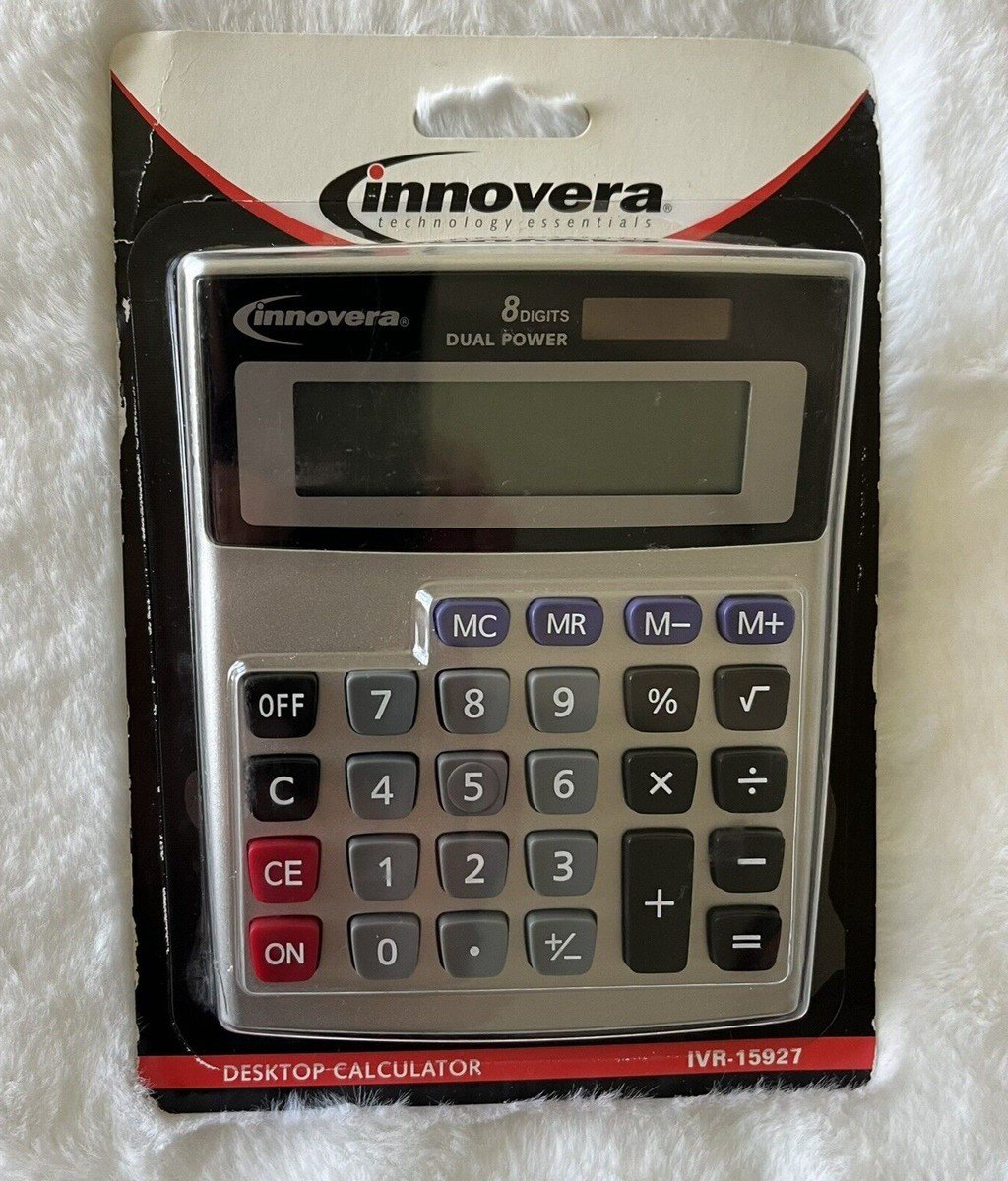
The Innovera 15927 is a desktop calculator designed for straightforward everyday arithmetic in an office, shop, classroom, or home workspace. Product listings identify it as a dual-power, eight-digit LCD calculator with solar and battery power, an angled display, four-key memory, and basic functions such as percentage, decimal, and plus/minus operations.
One specification is especially important to confirm before buying: the 15927 is listed as an eight-digit model, not a 12-digit financial calculator. Retail listings may use similar descriptions across different Innovera models, so match the model number and UPC rather than relying on a generic title.
What is the Innovera 15927?
The Innovera 15927 is a compact desktop calculator for routine calculations. A retailer specification listing identifies the manufacturer’s model number as IVR15927 and the UPC as 686024159254. It describes a single-line LCD with eight display digits and a dual power arrangement using solar energy and a battery. The listed size is approximately 5.42 by 4.39 by 1.15 inches, with a 15 mm display-character height.
The product appears in some retailer catalogues as discontinued. That does not necessarily mean every remaining unit is unavailable, but buyers should check stock status, return terms, battery inclusion, and warranty details before placing an order.
Main features
Eight-digit LCD display
The display shows up to eight digits. This is enough for many everyday tasks such as adding receipts, calculating change, checking small inventory totals, working out percentages, and performing basic school exercises. It is not intended for large financial models or long calculations that require a 12-digit display.
Dual solar and battery power
The calculator is listed with both solar and battery power. Solar assistance can help in suitable lighting, while the battery provides power when the light level is not sufficient. Dual-power designs can be convenient on a desk where lighting conditions change during the day. Check the manual or packaging for the battery type and replacement procedure.
Angled display
The product listing describes an angled LCD. This can make the figures easier to read when the calculator is placed flat on a desk and viewed from a seated position. The display should be checked for clarity, contrast, and missing segments if you are inspecting a used unit.
Four-key memory and common functions
Listings identify four-key memory, percentage, decimal, and plus/minus functions. Memory keys can help store and recall a subtotal while you continue working. Percent calculations are useful for discounts, markups, tax estimates, and basic comparisons, but the user should understand whether the calculator’s percentage key behaves as expected for the calculation being performed.
Where a desktop calculator is useful
Retail counters and small shops
At a retail counter, a desktop calculator can help total small purchases, work out a discount, verify the change due, or check a simple stock count. Keep it near the till or order book, and confirm each entry before completing a sale. For complex tax or accounting calculations, use the business’s approved point-of-sale or accounting system.
Office administration
Office staff may use a compact calculator to check invoices, add line items, estimate expenses, compare quotes, or verify a spreadsheet total. It is useful as a quick independent check, but sensitive financial records should still be stored in a proper accounting system with an audit trail.
School and home use
Students and households can use a simple desktop calculator for arithmetic practice, budgeting, percentage calculations, and checking totals. For coursework involving algebra, trigonometry, statistics, or graphing, first confirm which functions are permitted or required by the instructor or examination board. A basic eight-digit model will not replace a scientific or graphing calculator.
How to use the percentage and memory functions
For a basic percentage calculation, identify the base amount and the rate. For example, to find 10 percent of 250, calculate 250 multiplied by 10 and divide by 100, or use the percentage function according to the calculator’s key sequence. Because percentage keys can behave differently across models, test the sequence with a simple example before using it for a customer transaction.
Memory operations can help when a calculation contains several subtotals. A user might add a group of items, store the subtotal, perform another calculation, and then recall the stored number. Clear memory when changing tasks so a previous result is not accidentally included in a new total.
Buying the Innovera 15927: checks to make
- Confirm the model number. Look for IVR15927 and UPC 686024159254 in the listing or on the packaging.
- Check the digit count. The published specification is eight digits. Do not pay extra for a listing that mistakenly advertises it as a 12-digit model.
- Verify power details. Check whether the battery is included and which replacement type is required.
- Inspect the display. Confirm all digits and segments work and that the screen is easy to read.
- Test keys. Try arithmetic, decimal, percentage, plus/minus, and memory functions.
- Review condition and return policy. This is particularly important for discontinued or resale stock.
One product catalogue entry at Zoro’s Innovera 15927 specification listing identifies the eight-digit LCD, dual power, angled display, dimensions, and memory features. A second retailer entry also lists the 15927 model number with an eight-digit display, so compare the manufacturer number carefully when search results display nearby model names. For general office purchasing, see Staples’ calculator category to compare the 15927 with other desktop and scientific models.
Innovera 15927 versus a scientific calculator
A desktop calculator is designed for simple arithmetic and convenient desk use. A scientific calculator adds functions such as powers, roots, logarithms, trigonometry, and sometimes statistics. A financial calculator may include time-value-of-money keys, amortization, and cash-flow functions. Choose the tool based on the work rather than the appearance of the keypad. If you routinely calculate loans, depreciation, or complex tax figures, an eight-digit basic calculator may be limiting.
For related office and cost-planning topics, explore our Business resources, Finance articles, and Technology coverage. Our guide to comparing GoodRx with insurance prices is another example of why checking the numbers and assumptions behind a comparison matters.
Frequently asked questions
How many digits does the Innovera 15927 display?
Retail specifications identify it as an eight-digit LCD calculator.
Is the Innovera 15927 dual power?
Yes. Listings describe solar and battery power. Check the exact packaging or listing for battery details.
Does it have memory keys?
Yes. Product specifications list four-key memory, along with common functions such as percent, decimal, and plus/minus.
Is it suitable for advanced financial calculations?
It is a basic desktop calculator. It does not replace a dedicated financial or scientific calculator for advanced functions.
Practical examples for daily work
Checking a receipt: Add the listed item prices and compare the result with the printed total. Calculating a discount: Use the percentage key to work out a discount amount, then subtract it from the original price. Adding stock quantities: Use memory to keep a subtotal while you count several shelves or product groups. Budgeting: Add recurring expenses or compare a planned amount with actual spending. These are typical tasks for a basic desktop calculator, but they should be checked when an error could affect a customer’s payment or a financial record.
For percentage calculations, know whether you need the percentage amount or the final amount after a discount. For example, 15 percent of 200 is 30; the amount after a 15 percent discount is 170. A calculator can produce both results, but the user must choose the correct operation. Likewise, when adding tax, confirm the rate and whether it is applied before or after a discount according to the relevant rules.
Limitations to consider
An eight-digit calculator is appropriate for small figures but may not display larger totals in the way some accounting tasks require. It does not provide advanced financial functions such as loan amortization, internal rate of return, net present value, or time-value-of-money calculations. It is also not a substitute for a spreadsheet when you need to keep a history, apply formulas across many rows, or share a calculation with colleagues.
For business use, write down the source figures and the date of a calculation when the result supports a payment, order, or report. Check totals independently when possible, especially when entering several numbers quickly. If the calculator has solar assistance, test it under the lighting conditions where it will be used; keep the battery in good condition so that the screen does not fail when the desk is in shade.
Care and everyday maintenance
Keep the calculator on a stable, dry surface and clean the keys with a soft, lightly damp cloth rather than spraying liquid directly onto the unit. Avoid dropping it or storing it under heavy objects that could damage the display. If the display becomes faint, check lighting and battery condition before assuming the unit has failed. When a calculator is shared in a shop or office, clear the memory between users and verify the display before beginning a new task.
Conclusion
The Innovera 15927 is a compact desktop calculator for everyday arithmetic, featuring an eight-digit LCD, dual solar and battery power, an angled display, four-key memory, and common percentage and decimal functions. It can suit simple retail, office, school, and household tasks. Confirm the model number, digit count, battery details, and stock condition before buying, especially when comparing listings for discontinued products.
